
Filter & Sort
You can combine text search (both semantic and metadata) with other filters and sorting options for precise results.
Filtering Results
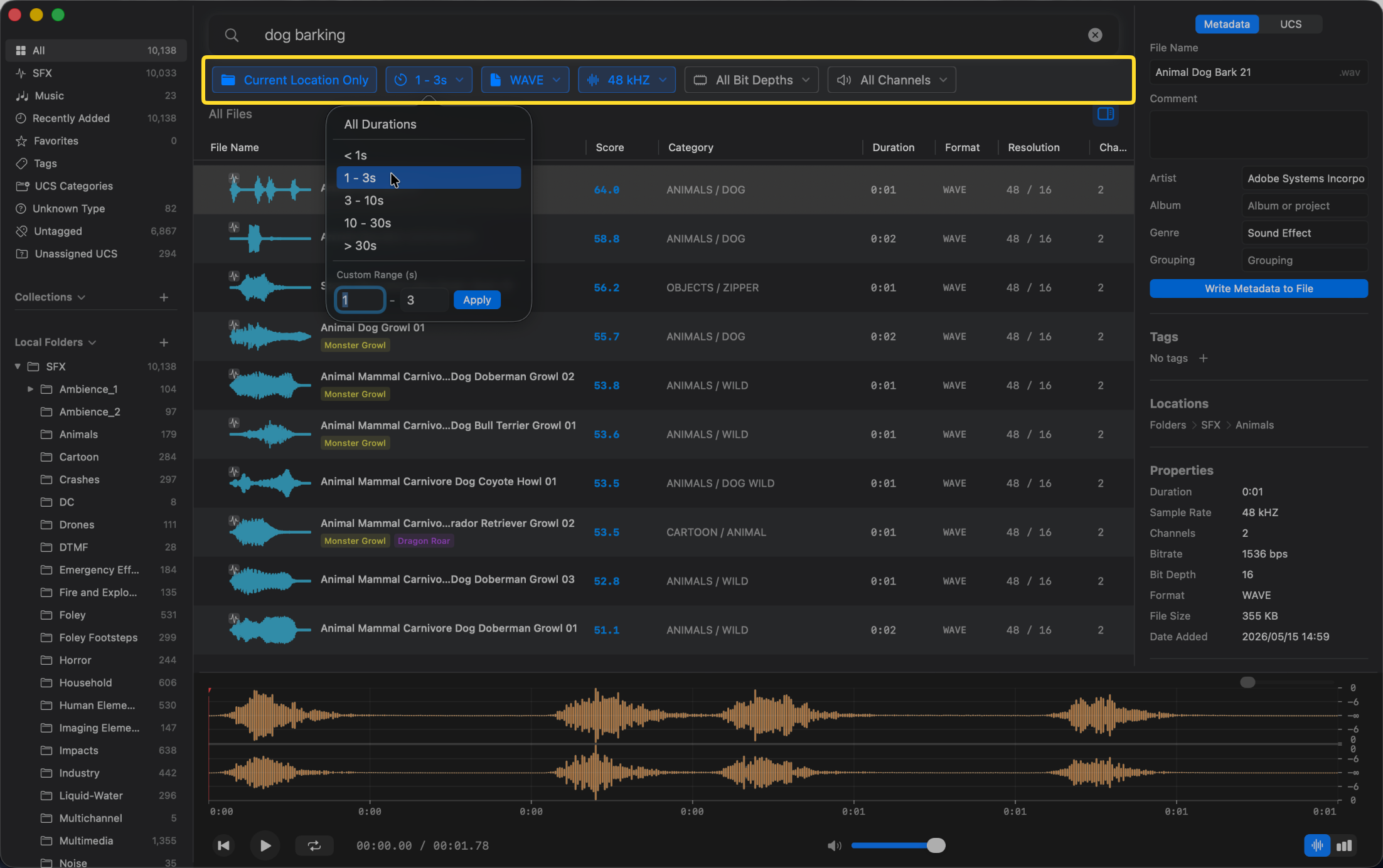
Use the dropdowns below the search bar to filter by:
- Duration — preset ranges (< 1s, 1–3s, 3–10s, etc.) or a custom range
- Format — Automatically lists the formats present in your library (e.g., WAV, AIFF, MP3, FLAC)
- Sample Rate — Automatically lists the sample rates of your imported files (e.g., 44.1 kHz, 48 kHz, 96 kHz)
- Bit Depth — Automatically lists the bit depths found in your library (e.g., 16-bit, 24-bit, 32-bit)
- Channels — Automatically lists the channel layouts present (e.g., 1, 2, 6)
Sorting Results
You can sort your results by simply clicking on any column header in the Asset List. All columns are sortable, including:
- File Name — Alphabetical sort by file name
- Score — Sort by semantic relevance (available when using semantic or hybrid search)
- Duration — Sort from shortest to longest (or vice versa)
- Category, Format, Resolution, Channels, Date Added — Group and order files by these respective properties
Tip: You can combine multiple filters at the same time. For example, search for “dog barking” while filtering to WAV files between 1–3 seconds at 48 kHz, and then sort the results by Duration.